Overview
AI2UI is a browser-based playground where users describe UI in plain language—e.g. “Create a login form”, “Build a pricing page”, “Design a user profile card”—and receive live, editable UI in real time. The app streams structured specs (JSON or YAML) from an LLM, applies them incrementally, and renders the result with a shared component catalog. Users can iterate by sending follow-up prompts and can inspect the underlying spec, the raw stream, or generated React code.
Problem
- Friction between idea and UI: Going from “I want a login form” to a real, working interface usually means writing markup, styling, and state by hand or copying templates and adapting them.
- No single place to experiment: Design tools don’t run the real UI; code editors don’t speak natural language. There was a gap for “describe → see → tweak” without leaving the browser.
- Specs as a middle layer: Raw LLM output is often unstructured. A stable, parseable spec format (with streaming and incremental updates) was needed so the app could show live previews and support iteration instead of one-shot generation.
Solution
I2UI turns natural language into a declarative UI spec (powered by [@json-render](https://www.npmjs.com/package/@json-render/core)) and renders that spec in real time with a fixed catalog of components (Card, Stack, Grid, form controls, dialogs, etc.). The flow is:
- User types a prompt (e.g. “Create a contact form with name, email, and message”).
- Backend streams a response from Groq (Llama 3.3 70B), using a system prompt that describes the spec format and the component catalog.
- Client consumes the stream as JSONL patches or YAML in fenced blocks, applying each patch to an in-memory spec so the UI **updates progressively** as tokens arrive.
- A React renderer turns the spec into live components (shadcn/Radix), with state binding, validation, and actions (e.g. form submit, button click) wired to toasts or callbacks.
- User can iterate by sending another prompt (e.g. “Add a phone field”); the current spec is sent as context so the model can merge, patch, or diff.
The app also exposes multiple views: raw spec (JSON/YAML), nested tree, raw stream, component/action catalog, live preview, and generated React/JSX(via @json-render/codegen) so users can see the equivalent code and copy it.
Tech Stack & Architecture
- Framework: Next.js 16 (App Router), React 19.
- AI: Vercel AI SDK (streamText) + Groq with llama-3.3-70b-versatile.
- Spec format & runtime:@json-render/core, @json-render/react, @json-render/codegen, @json-render/yaml for schema, prompts, streaming compilation, and rendering.
- UI: Tailwind CSS 4, shadcn-style components (Radix primitives), Sonner toasts.
- Layout: Resizable panels (desktop), responsive layout with a bottom prompt and a sheet for version history (mobile).
- API: Single POST /api/generate route that reads GROQ_API_KEY, enforces a 10-minute cooldown per client (IP / x-forwarded-for), and streams plain text; usage metadata is appended at the end of the stream.
Key architectural choices:
- Streaming: The UI updates as the model outputs patches (JSONL or YAML), so users see structure and layout appear incrementally instead of waiting for a full response.
- Edit modes: The system supports patch, merge, and diff semantics so the model can extend or modify the existing spec based on follow-up prompts.
- Catalog-driven rendering: A single catalog (Zod schemas + descriptions) defines what the model can generate; a registry maps each catalog component to real React components (Button, Input, Card, Tabs, etc.), keeping the renderer generic and the design system consistent.
Features
- Natural language → UI: Describe forms, dashboards, pricing pages, profile cards, etc., and get a live preview.
- Dual spec format: Choose JSONL (patch stream) or YAML (fenced blocks) for generation.
- Iterative editing: Follow-up prompts use the current spec as context (patch/merge/diff) so users can refine without starting over.
- Version history: Each generation is stored as a version; users can switch between versions and see token usage (prompt/completion/cached) per version.
- Multiple views: Spec (JSON/YAML), nested tree, raw stream, component and action catalog, live preview, and generated JSX.
- Copy-friendly: Copy spec, stream, or generated code for use elsewhere.
- Responsive layout: Resizable three-pane layout on desktop; toolbar + single content area + bottom input and versions sheet on mobile.
- Guarded API: Server-side API key, optional rate limiting, and no spec execution on the server—only streaming text.
Design & UX Decisions
- Prompt rules in the system prompt: Rules like “no viewport height classes”, “use Card as root for forms”, “use realistic sample data”, and “always pair validation with $bindState” keep generated UIs consistent and usable inside the fixed preview container.
- Progressive rendering: Applying patches as they stream makes the experience feel responsive and shows the model “thinking” in structure rather than in a single blob of JSON at the end.
- Single-page playground: No routing; focus is on prompt → preview → iterate, with versions and tabs for spec/stream/code/catalog.
- Catalog as documentation: The catalog tab lists every component and action the model can use, with props and types, so the app doubles as a reference for the spec format.
Challenges & Learnings
- Streaming format: Supporting both JSONL and YAML required a robust client-side parser (fence detection, incremental YAML compilation, diff application) so that partial or multi-block outputs still produce a valid spec. Handling malformed or truncated streams without breaking the UI was important.
- State and versions: Keeping “current spec” and “selected version” in sync during streaming, and passing the right previousSpec on follow-up prompts, required clear state ownership (refs for submit handler, state for selected version and list of versions).
- Mobile layout: Reusing the same chat/code/preview content in a different layout (toolbar + single pane + sheet) without duplicating logic was done by parameterizing the visible view (spec / nested / stream / catalog / preview / code) and reusing the same state and components.
- Rate limiting: A simple in-memory cooldown per client ID (IP) keeps abuse low without a database; for production at scale, a Redis or similar store would be more appropriate.
Outcomes
- Working playground: Users can go from a short prompt to a visible, interactive UI in seconds and iterate with natural language.
- Transparent pipeline: Spec, stream, and generated code are all visible and copyable, which supports learning and reuse.
- Stable foundation: The app is built on a well-defined spec format and catalog, so adding components or changing the model only touches the catalog and registry, not the streaming or rendering core.
- CI: Lint, type-check, and build run on GitHub Actions for every push/PR to main.
Summary
AI2UI demonstrates building a production-style AI UX around a declarative spec: streaming, incremental updates, iterative editing, and multiple views (preview, spec, code) in one place. It showcases integration of an LLM API (Groq), a structured output format (@json-render), and a modern React/Next.js stack with responsive layout and clear separation between prompt engineering, spec parsing, and rendering.
Links & ScreenShots
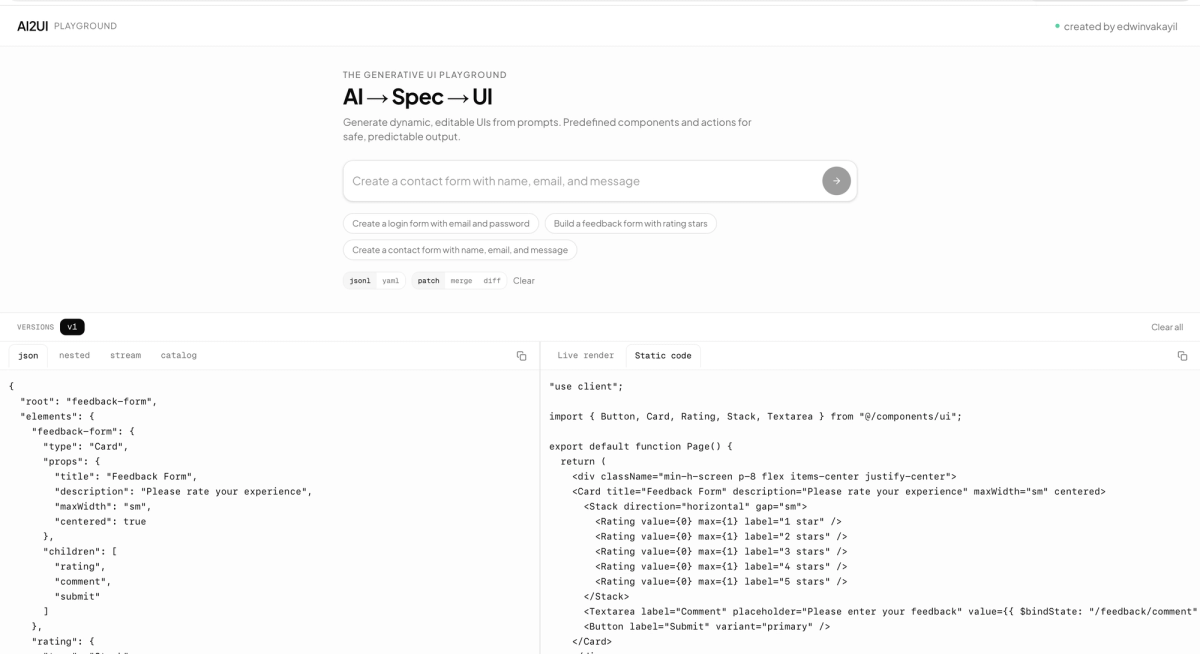
Live Link : ai2ui.edwinvakayil.info